
Public · Market context
Review the validated-ledger state,  XRBC spot estimate, AMM reserves, tool explanations, and safety disclosures without connecting Xaman.
XRPL Mainnet · Public metrics + Xaman-reviewed actions
XRBC Ecosystem Tools
Find a workspace, understand what it does, and choose your next step. Explore public data now; connect Xaman when you need wallet-specific tools.
Public XRPL data
XRBC market overviewRead-only metrics load without connecting a wallet.
XRBC spotLoading… XRP reserveLoading…XRBC reserveLoading…
ECOSYSTEM WORKSPACES
Open a workspace to see its data, access requirements and available actions.
Exchange assets, manage a pool position, or review orders.
XRBC with a live quote and review the transaction in Xaman.Wallet signing
Liquidity poolReview XRBC pool deposits, withdrawals and your current LP-token balance.Wallet signing
Liquidity ScannerInspect token pools, estimated price impact and liquidity conditions.Market analysis
Order ManagerInspect existing offers and choose the orders you want to cancel.Wallet tools
Look more closely at assets, issuers and market conditions.
XRBC · advanced
Sentinel ForensicsInvestigate market and issuer evidence with bounded forensic analysis.Advanced analysis
Risk LensReview liquidity, exit capacity, concentration and issuer authority.150 XRBC · advanced
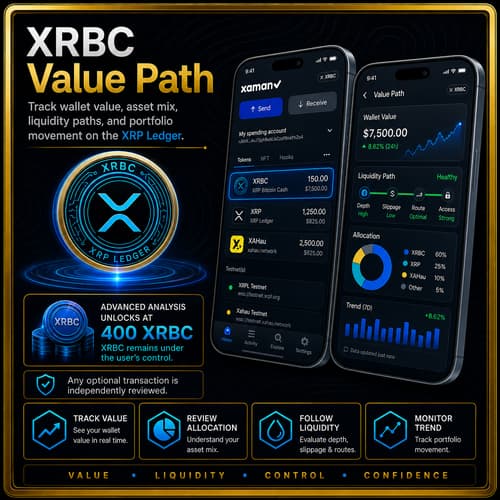
Value PathCompare liquidity routes, order books and price movement.400 XRBC · advanced
WatchtowerMonitor changes in liquidity, issuer controls and trustline conditions.1,000 XRBC · advanced
Bridge IntegrityReview bridge-risk evidence and caution indicators. No bridging workflow.Read-only research
Organize asset evidence and review project or payment records.
XRBC · advanced
Institutional ReadinessReview project evidence, disclosures and operational controls.Evidence review
Settlement DeskPrepare payment records and inspect their validated ledger evidence.Wallet-reviewed payments
Advanced access conditions are checked by each destination. Read its requirements before connecting; listed thresholds do not represent a payment to this hub.
Access & permissions
The hub stays useful without a wallet. Connection adds wallet-specific public-ledger context; signing remains a separate action every time.
Review the validated-ledger state, XRBC spot estimate, AMM reserves, tool explanations, and safety disclosures without connecting Xaman.
Deliberately connect Xaman to inspect the active account’s public trustlines, token liquidity, and open offers. Connection does not authorize a transaction.
Trustlines, purchases, offers, conversions, and cancellations each require their own Xaman review. The page never receives a secret key.
Each destination independently checks its disclosed XRBC threshold. Holding XRBC is an access condition, not a payment to the website.
XRBC holding gate. On linked advanced tools, a browser balance check can explain eligibility but cannot secure a privileged server endpoint by itself. Any protected backend must independently verify wallet proof and current eligibility, then enforce short-lived capabilities, method limits, rate limits, idempotency, and one active job per capability. CORS is not access control.
Wallet-side authorization
Open Xaman on this device or scan the QR code.
Match the verification code and inspect the issuer, amounts, destination, flags, and network inside Xaman.
Wallet-specific market analysis
Score up to 50 positive trustline balances returned for the connected wallet against each token’s available public XRP Ledger AMM.
Pool reserves are not wallet balances.
The scanner reads the wallet only to identify held tokens. Reserve figures describe the public AMM for each token.
XRBC marketXRBC / XRP public AMMXRBC market statusXRBC pool scoreConnect Xaman to score each positive wallet token balance.
Per-token results
Every token is evaluated separately. A score measures its public market liquidity—not the value or safety of the connected wallet.
| Token | Wallet balance | Public pool | Public AMM reserves | Trading fee | Estimated price impact 10 / 100 XRP |
Risk score | Status |
|---|
XRBC ACCESS SETUP
XRBC TrustlinePrepare or verify the XRBC trustline in Xaman. Acquisition controls are centralized in the main trading terminal instead of repeated on this page.
The XRBC TrustSet enables No Ripple for the connected holder account; it does not permit other payments to route through the wallet.
XRBC issuerrEjwniYhYR5QDZzK1a1x2359j8j8N43YpwMarket history · read only
XRP chart with XRBC movementStart at the earliest history returned by the sources. The blue line shows XRP in US dollars; the green underlay shows XRBC priced in XRP.
XRP / USD · left scale XRBC / XRP · right scale. These use different units and separate scales; matching heights do not mean equal prices or returns.
History loads when this section is in view. Wallet controls work independently.
No historical observation selected.
XRP: waiting for Kraken weekly history.
XRBC: waiting for exact XRBC/XRP trade history.
MAX means all history returned by these sources, not a promise of complete history from token creation. XRBC launched on January 5, 2022; an earlier portion of its history may be unavailable from the provider. Each series reports its actual first and last returned date. Missing weeks remain gaps and no history is invented.
XRP uses Kraken’s weekly XRP/USD candles (up to 720 records). XRBC uses the existing read-only history service and OnTheDEX for the exact issuer and currency shown above. The current week may still be forming. This chart is context only and never determines a transaction or its signed limits.
XRPL decentralized exchange
Choose tokens to sell and the lowest price you will accept for each one. Preview the order, then approve it in Xaman.
READ FIRST — Signing places a real sell order immediately. It can sell right away if a buyer meets your price. This is not a stop-loss: it does not wait for a price drop and cannot guarantee a sale or prevent a loss.
XRP or  RLUSD you want for one token. The same price is applied to every selected token, so use separate runs when tokens need different prices.
CHECK THE UNITS — Example: 100 XRBC at 0.02 XRP each requests 2 XRP for the full amount, before any applicable fees. An order may fill in parts; its remaining amount can stay open until filled, cancelled or expired.
Expiry sets how long an unfilled order may remain usable. An open order can use part of your XRP owner reserve. Use Open XRPL Orders below to review or cancel it later. Cancellation cannot undo a trade that has already filled.
Amount you want for ONE token, in the receive asset selected beside this field. This is a price, not the number of tokens to sell.
Choose what should arrive in your wallet if the order fills.
Receiving RLUSD requires the official RLUSD Mainnet trustline.
Choose how long an unfilled order can remain active. Review long-lived orders regularly because prices can change.
Account objects
Clean up this wallet’s open sell and buy orders in one place, even if you originally placed them through another XRPL exchange interface.
One shared ledger, one order. Once a cancellation is validated on the XRP Ledger, that order is removed for every exchange interface using the same on-ledger order book. You do not need to visit the website where you placed it.
EACH ORDER NEEDS A SIGNATURE. “Cancel all visible” queues up to 20 separate cancellations; review and approve each one in Xaman. It stops if a cancellation fails or is rejected.
Check what remains. Only loaded orders for the connected wallet are included. Repeat after reloading if more remain. Filled trades cannot be undone. Orders held inside a custodial exchange’s own system and NFT offers are not included. Network fees still apply.
Connect Xaman to load open orders.
Swipe, drag, or use Shift + mouse wheel to move left and right through the order details.
High-risk workflow
Review routes for exchanging eligible token balances into XRP or RLUSD, then decide whether to approve each conversion in Xaman.
READ FIRST — You approve each conversion separately. Nothing is sold just by opening this tool or previewing the queue. Review the final “at least” amount in Xaman before signing.
XRP or 2 RLUSD, and considers at most 20 positive balances per run.Pool changes do not always block a trade. It can still complete if the signed limits are satisfied. A failed submitted transaction may still cost a network fee. Earlier completed conversions or cancellations remain completed if a later step stops.
If the fresh estimate used to prepare a request is 100 XRP, a 2% allowance sets a minimum of about 98 XRP. Check the actual minimum shown in Xaman. Raising the percentage accepts a larger difference from the estimate; it does not make an unavailable route safe.
The optional cancellation step also needs one Xaman signature per visible order. Success is reported only after ledger verification; signing alone is not confirmation.
Receiving RLUSD requires the official RLUSD Mainnet trustline.
Sets how far below the fresh estimate the protected minimum may be. Example: 2% below 100 XRP is about 98 XRP. A larger percentage accepts a worse result.
Receipts and activity
Use this record to double-check what these tools tried, what you approved and what the ledger confirmed. A preview is only a plan; signed or submitted means confirmation is still pending. Look for a validated success and transaction hash before treating a transaction as complete.
Download a copy for your records before clearing or leaving this page. It includes this visit’s visible activity and latest result, not your wallet’s full transaction history or an independently verified receipt.
Important disclosures